Blog
Streamline Your Booking Agency Workflow Without WhatsApp Chaos
A practical, low-drama workflow for small booking agencies and party bands: fewer follow-ups, no zombie gigs, and one source of truth – powered by Gixtra.
Running a small booking agency (or a party band that books itself) gets messy the moment your workflow lives in three places: a shared calendar, a WhatsApp group, and a cursed email thread. The simplest way to streamline your booking workflow is to centralize availability, gig details, and confirmations in one system – and use automation so cancellations don’t turn into zombie gigs. That’s exactly what Gixtra is built for.
The real problem isn’t “organization” – it’s lost time and lost money
Most booking chaos isn’t dramatic. It’s death by a thousand cuts.
You ask six musicians if they’re available. Four reply. One replies two days later. One never replies. Then the client wants an answer today.
You update the setlist. Someone sees an older PDF in the WhatsApp scroll and rehearses the wrong songs.
You change the dress code. Someone misses the update and shows up in the wrong outfit. Everybody feels it.
You cancel an optional date. Someone doesn’t notice. Their calendar stays blocked. They decline another paid gig. Money left on the table – for no reason.
This isn’t “just admin.” It’s operational risk.
A streamlined booking workflow that actually works
Here’s a workflow that scales from “agency with 3 bands” all the way to “musician pool with 100 people,” without you turning into a full-time reminder machine.
1) Start with a gig inquiry – and invite multiple options
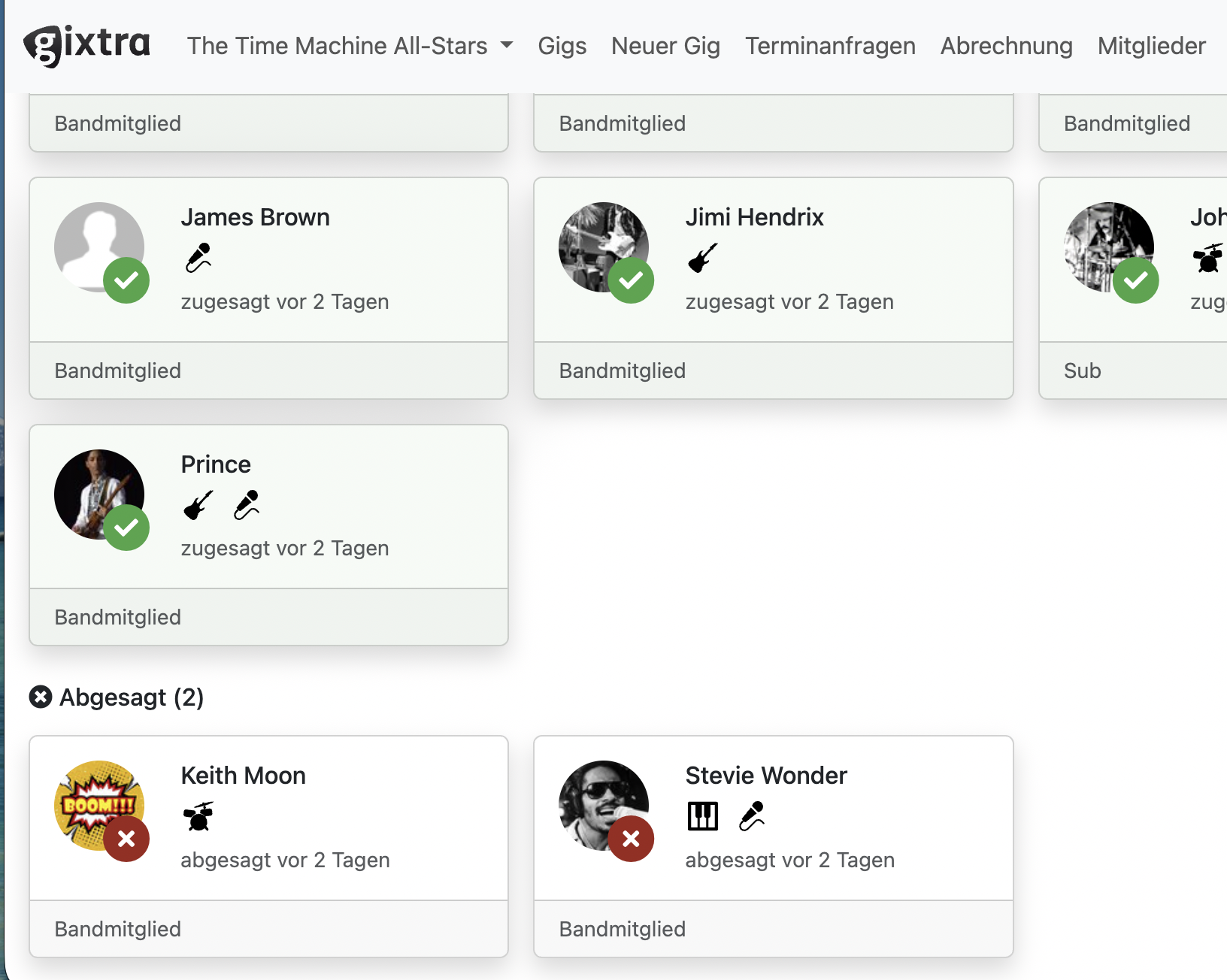
When a client asks, “Are you free on June 14?”, you need an answer fast. In Gixtra, you create a gig (or inquiry) and invite the musicians you want for that lineup – including two drummers if you’re unsure who’s available.
In Gixtra, every invited musician can respond:
- Yes, I’m in
- No, I’m out
- (Optionally) change their mind later – if you allow it
As the booker, you see an immediate overview of who responded and who didn’t – so you can follow up with precision instead of spamming the whole group.
2) Stop chasing people – let the system handle reminders
The “who hasn’t answered yet?” problem is where most agencies bleed time.
Gixtra makes the response status visible at a glance and supports nudging people to respond without you playing WhatsApp detective. Less emotional friction. More clarity. More speed.
3) Confirm the lineup – then let calendars sync automatically
Once a musician accepts a gig, Gixtra can sync that gig into their calendar (Google Calendar, Apple Calendar, Outlook – whatever they use). That means:
- musicians see the gig where they already live (their calendar)
- agencies don’t have to manually copy/paste details 20 times
- last-minute “where do we play again?” panic drops sharply
And here’s the killer detail: if the gig gets cancelled, it disappears from their calendar automatically (when synced). That’s how you eliminate zombie gigs and protect earning opportunities.
4) Store all gig-critical details in one place
A streamlined workflow isn’t just about dates. It’s about removing frantic searches on gig day.
In Gixtra, a gig can hold the details that always cause chaos when they’re scattered:
- venue address (and hotel address if needed)
- schedule times (arrival, soundcheck, doors, show start/end)
- setlist (single source of truth – no “wrong PDF” roulette)
- dress code
- technical notes and coordination with the audio tech
- navigation link (“route me there” when you’re already loading the car)
If your calendar is synced, your car’s navigation can often pick up the address from the calendar event automatically. If not, you open Gixtra, tap the current gig, and navigate with your preferred maps app. Simple. Reliable. Fast.
5) Handle subs like a grown-up agency
Subs are normal in the gig world. The problem is running them through chaotic, informal backchannels.
Gixtra supports substitute musicians in a structured way, including an optional call chain approach: if the first sub can’t do it, it can move to the next, and so on. No copy/paste. No “who did we ask already?”
And if you need discretion, Gixtra supports a sub role where subs only see what they need to see. They don’t see your full calendar, your other gigs, or anything unrelated. That’s how you keep things professional and reduce unnecessary social drama.
6) Track expenses after the gig – without begging
After the gig, the work isn’t done. Someone drove 180 km. Someone bought train tickets. Someone paid parking.
Gixtra can remind musicians to enter travel expenses so the booker can process payouts cleanly. Whether your model is “fixed fee per musician” or “split revenue after costs,” the workflow stays manageable because the inputs show up in a predictable place.
7) Control what people can see (because bands are human)
Some groups want full transparency. Others absolutely don’t.
Gixtra is designed for real band dynamics, including cases where musicians should not see:
- other musicians’ fees
- the total revenue of a gig
- gigs they’re not involved in
That’s not secrecy. That’s avoiding unnecessary tension while still operating fairly and professionally.
What you can do today (even without Gixtra)
If you’re not ready to switch tools yet, here’s the minimum viable workflow you should enforce:
- one official place for gig details (not WhatsApp)
- one official latest setlist (not “some PDF someone forwarded”)
- a clear rule for cancellations (“confirmed cancellation must remove calendar blocks”)
- a follow-up checklist for non-responders
- a standard post-gig expense process
You can do this manually. It’s just tedious. It breaks under load. And it turns the booker into a human CRM.
Gixtra exists to remove that burden.
The quiet advantage agencies underestimate: founder-level support
Most SaaS tools give you a help center and a chatbot.
Gixtra customers often mention something different: you can message the founder and get a real answer fast – from a gigging musician who understands the reality behind your question.
That means edge cases get solved. Exports get built when you need them. Paper trails can be clarified when there’s a dispute. The tool evolves with real user feedback – not corporate guessing.
FAQ
What’s the fastest way to coordinate musician availability for a gig?
The fastest way is to invite musicians to a gig inquiry where each person can respond yes or no in one place, and the booker can immediately see who replied and who didn’t. Gixtra supports this workflow and keeps it visible without endless follow-ups.
What is a zombie gig and how do you prevent it?
A zombie gig is a calendar block that remains even though the gig is cancelled or never confirmed, causing musicians to decline other paid work. Gixtra prevents zombie gigs by syncing confirmed gigs to calendars and removing them automatically when the gig is cancelled.
Can booking agencies use Gixtra with large musician pools?
Yes. Some Gixtra users manage pools of 50 to 100 musicians and assemble lineups per gig based on availability and role needs.
Can musicians see gigs they’re not part of?
They don’t have to. Gixtra supports role-based visibility so musicians, especially subs, can be limited to only the gigs and information relevant to them.
Can musicians change their availability response after responding?
They can if you allow it. Gixtra supports flexible rules depending on how your band or agency operates – from people being able to change their mind to more locked-down confirmations.
Does Gixtra handle client contracts?
No. Gixtra focuses on band and gig logistics: availability, confirmations, gig details, calendar sync, substitutes, and post-gig admin. Client contracts are a separate workflow.
Ready to streamline your gig management?
Gixtra is the tool helping musicians and booking agencies organize their gigs, manage schedules, and coordinate with band members effortlessly.